Start Here · 4 of 20
Your Account & Confidential Data
What is safe to put into Claude on an Enterprise or Team plan, and the limits that still apply.
The first honest question any private equity professional asks is simple: “Is it safe to put confidential material into this?” You should know the answer before you upload a single page. This guidance is operational, not legal advice; your firm’s own policies and the specific deal’s NDA always govern.
The Enterprise and Team guarantee
Your firm provides Claude on the Enterprise and Team plans, and the most important property of those plans is this: your prompts and uploaded files are not used to train Anthropic’s models. What you type and attach stays inside your organization’s workspace and is not absorbed into a future version of Claude.
That is a genuine, meaningful difference from the consumer accounts (Free and Pro) most people have seen. On consumer plans, content can be used to improve the models unless you opt out. On Enterprise and Team, that training use is off by the design of the plan, which is precisely why these plans are the appropriate place for professional, sensitive work.
Consumer plans are not the same
If you have used Claude personally, it is worth being explicit about the gap. The two are different products in the ways that matter for deal work.
Consumer vs. Enterprise/Team
| Consumer (Free / Pro) | Enterprise / Team | |
|---|---|---|
| Used to train models | Possible unless you opt out | No, never |
| Workspace | Personal, individual | Your firm’s workspace |
| Admin controls | None (it is your own account) | Set centrally: members, retention, connectors |
| Access management | Just you | Governed by your IT team |
| Suitable for deal data | No | Yes, within NDA and firm rules |
Use Enterprise/Team for any firm work. Consumer plans are for personal, non-confidential use only.
The practical rule is short: do firm work in your firm’s workspace, and keep personal accounts for personal, non-confidential things.
Confidentiality is about process, not just plumbing
The training guarantee handles one risk. It does not handle all of them. Confidentiality on a live deal is also about who can see the material and where it sits.
- Access. Who is in your workspace, and who can open a given conversation or Project, still matters. The plan keeps your data out of training; it does not decide who at your firm should see a particular deal.
- Workspace and Projects. Keep each live deal’s material inside its own dedicated Project. That separation is how you stop one engagement’s documents from drifting into another, and it keeps context clean. The Setting Up a Deal Project page walks through doing this properly.
- What the NDA permits. An NDA may restrict where material can be processed or who may view it. The plan’s properties do not override those terms; you do.
Before you upload: the decision
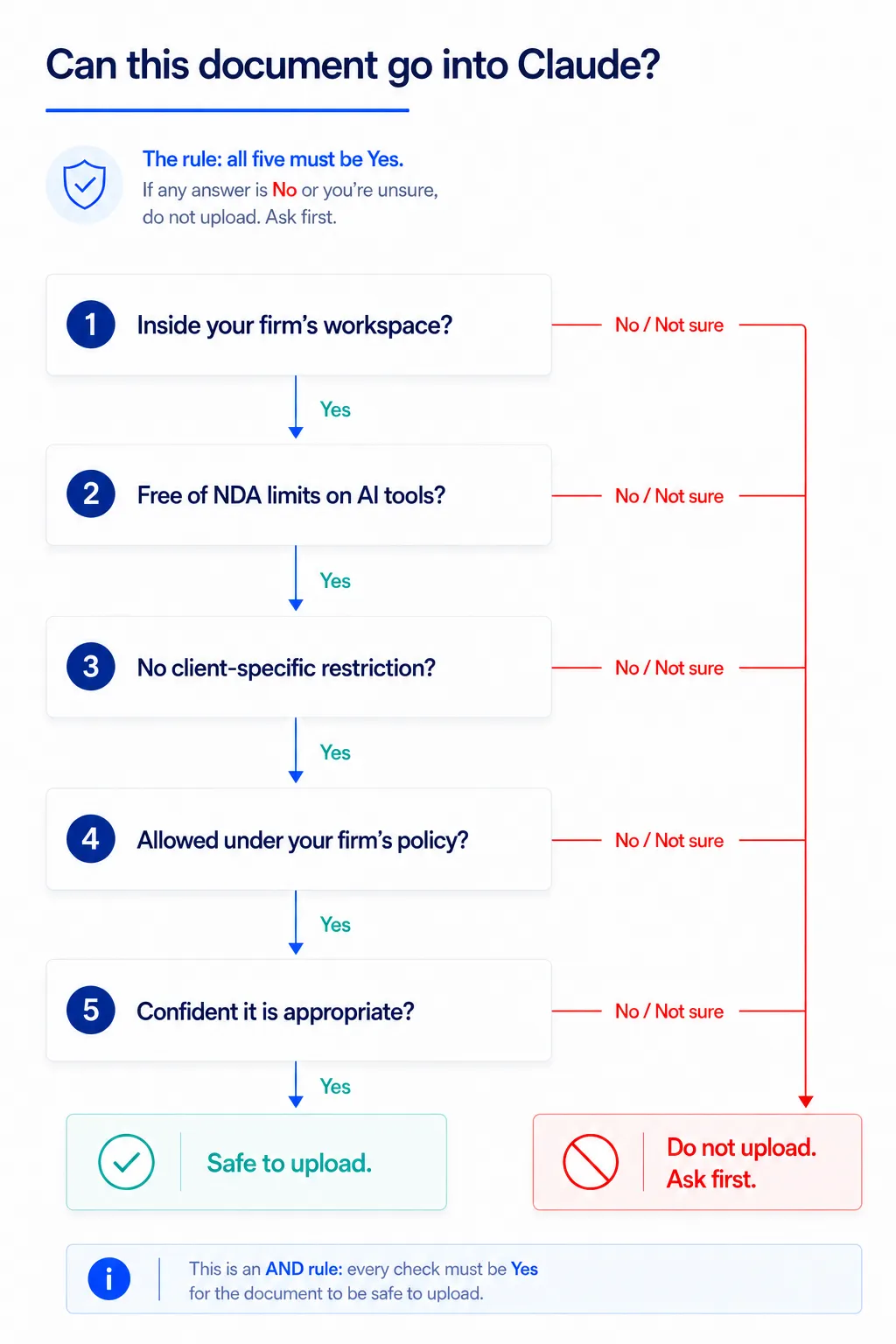
The plan keeps your material out of training, but a document can still be one you should not put in, because of an NDA, a client restriction, or your firm’s own rules. On a live mandate you might handle a signed teaser, a data-room extract, and a public annual report in the same afternoon, and each has a different answer. Work down these checks in order. The first “no”, or any doubt, stops you.
-
Are you in your firm's workspace?
Open Claude and confirm your firm is named at the top of the menu. If you do not see it, you may be in a personal account where uploads can be used for training. Stop, sign into the right account, and only then continue. No confidential document goes into a consumer plan, ever.
-
Is the document public?
If the material is already public (a published annual report, a press release, a company’s own marketing site, a regulator’s filing), it is low-risk by nature and almost always fine to use. Public information stays public. If yes, you can proceed. If no, keep going down the tree.
-
Is it under an NDA, and what does that NDA permit?
For anything tied to a live deal, the NDA governs. Some agreements restrict where material may be processed, which third-party tools are allowed, or who may see it. The plan’s training guarantee does not override those terms. If the NDA permits processing in approved tools and Claude qualifies under your firm’s guidance, continue. If it restricts processing, or you genuinely do not know what it permits, do not upload: ask first.
-
Are there client-specific restrictions?
Beyond the NDA, a client may have its own rules: named-individual access only, no cloud processing of certain categories, or specific data that must never leave a defined system. Honor those. They sit on top of everything else and are not yours to waive.
-
Does your firm's own policy allow it?
Your firm’s data-handling and risk policies are the final gate and they always apply. If internal policy says a category of material cannot go into a tool like this, that decision stands regardless of what the NDA or the plan would otherwise allow.
-
Still unsure? Then the answer is no, for now.
If you have reached this point and any gate is uncertain, treat the document as not-yet-permitted and check before uploading. “Ask first” is not a failure. It is the correct outcome whenever the answer is not clearly yes.
Common cases
Most documents fall into a few recognizable buckets. This is how the checks above usually resolve, not a substitute for them.
How the common cases usually land
| Document | Typical outcome | Why |
|---|---|---|
| A target’s published annual report | Generally fine | Already public |
| A press release or company marketing site | Generally fine | Already public |
| A teaser or CIM under a signed NDA | Usually fine if the NDA permits it | Covered by the plan and the agreement |
| A data-room document on a live deal | Check the NDA and client terms first | Restrictions may apply to where it is processed |
| Personal data (named individuals, HR records) | Pause and confirm | Data-protection rules apply on top |
| Anything you cannot place against an NDA | Do not upload, ask first | If you cannot trace the permission, assume there isn’t one |
Always defer to the NDA, the client's restrictions, and your firm's policy. This shows the typical outcome, not a guarantee.
Controls that are set above you
Some things are not yours to switch on or off, and that is intentional. They are managed centrally so the whole organization stays consistent and compliant.
- Connectors (links to sources such as a document store or Google Drive) are enabled or disabled by your IT team. If a connector you expect is missing, that is a deliberate configuration, not a fault. Raise it through the normal IT channel rather than looking for a workaround.
- Data retention (how long conversations are kept) is set at the organization level by your administrators, not per user.
- Membership (who is in the workspace and what they can do) is also managed centrally.
You do not need to manage any of this yourself. The benefit of a managed plan is that these guardrails are decided once, by the right people, and apply to everyone.
What this means in practice
Put the picture together and the working stance is straightforward:
- On Enterprise/Team, your prompts and files are not used for training, so the plan is appropriate for professional work.
- That guarantee does not replace an NDA or your firm’s data rules. Run the checks in Before you upload before a document goes in.
- Keep each deal in its own Project so material stays separated and access stays clean.
- Connectors, retention, and membership are handled by your IT team and administrators, not by you.
Used this way, Claude is a safe and capable partner for confidential deal work. The one judgment the technology cannot make for you is whether a specific document belongs in a specific Project: run the checks above every time. When you are ready to start a live engagement, see Setting Up a Deal Project. If any term here is unfamiliar, the Glossary keeps the plain-English definitions in one place.